What you get
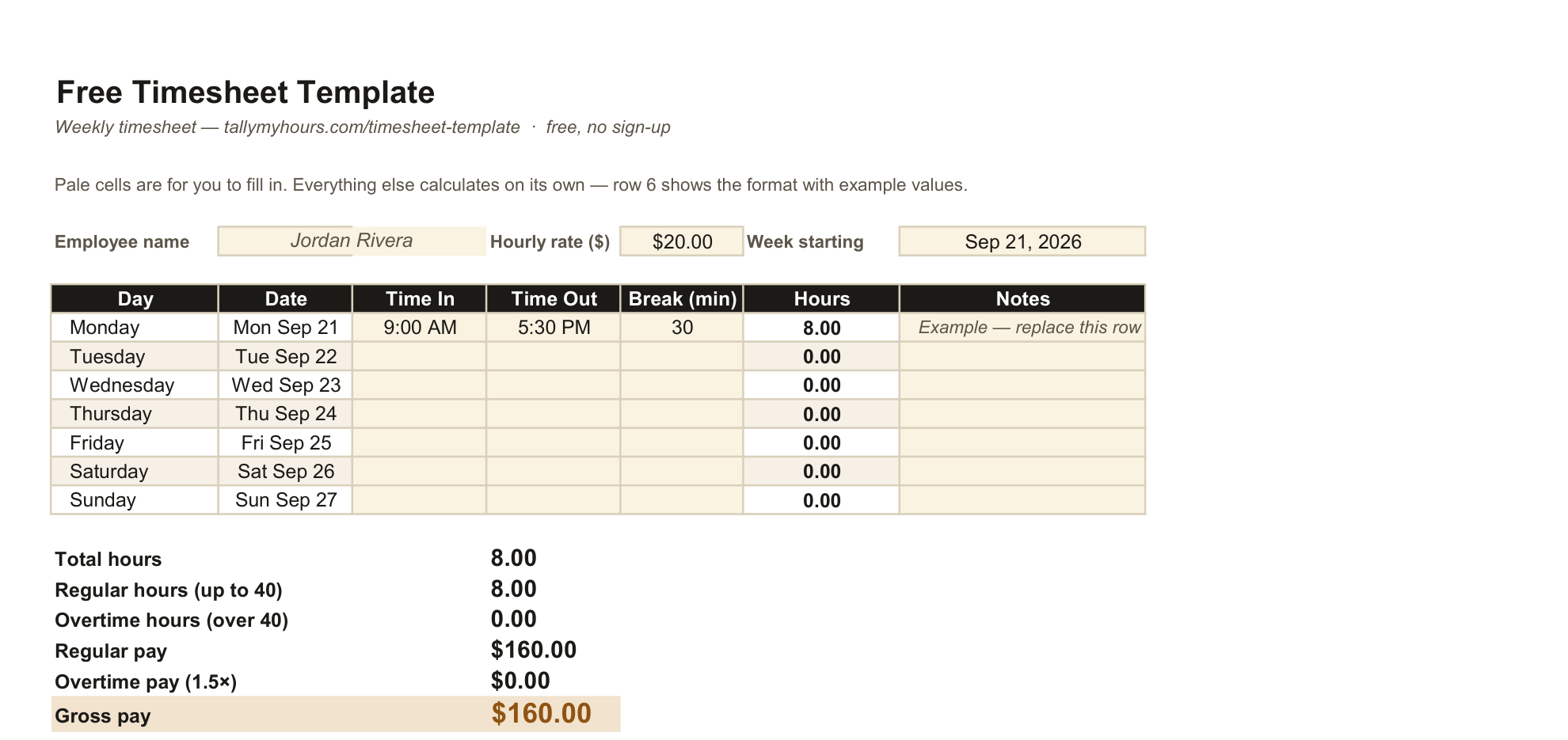
One Excel file with two tabs: a Weekly Timesheet and a Bi-Weekly Timesheet. Fill in a time in, time out and break for each day and the hours, overtime and gross pay work themselves out — nothing to retype and nothing to get wrong by hand. A PDF version is included for printing or for anyone who would rather fill it in by hand.
Every number that can be calculated is a formula, not a typed-in value. Change a time, and the day's hours, the week's totals, the overtime split and the gross pay all update on their own. That is also why it is safe to reuse the same file every pay period — the formulas do not go stale.
How to use it
- Download the .xlsx file and open it in Excel, Google Sheets or Numbers.
- Fill in your name, hourly rate and the week's start date at the top.
- Type each day's time in, time out and break minutes into the pale cells. Row 6 is filled in with an example — overwrite it with your own first day.
- Everything below fills itself in: daily hours, total hours, regular and overtime hours, and regular, overtime and gross pay.
Overnight shifts are handled the same way the rest of this site handles them — a time out that is earlier than the time in is read as crossing midnight, not as an error.
Weekly or bi-weekly?
Use whichever tab matches how you get paid. The bi-weekly tab is not just the weekly tab doubled: overtime is worked out separately for each of the two weeks, then added together, because that is how the federal 40-hour rule actually works. Fifty hours in week one and thirty in week two is ten hours of overtime, not zero, even though the fourteen-day total is under eighty.
Overtime, and its limits
The template assumes the federal default — time and a half for hours over 40 in a workweek. If your state adds a daily threshold or a higher multiplier, such as California's rules, this spreadsheet will not apply them; use the overtime calculator instead, which lets you set your own threshold and multiplier, or check the hours a different way with the time card calculator.
As with every calculator on this site, the result is an estimate for your own reference, not payroll advice. Always check it against your pay stub and your employer's written policy.
Prefer to do this online instead?
The time card calculator does the same job in the browser, with no download and no file to keep track of — useful if you only need one week and would rather not open a spreadsheet. This template is for people who want the same thing as a file they can reuse, print, or hand to someone else.
Does your employer round your punches to the nearest 15 minutes? That happens before any of this template's formulas see your times. The rounding calculator shows what that rounding is actually doing to your paid hours.
Common questions
Is this timesheet template really free?
Yes. There is no sign-up, no email capture and no watermark. Download it and use it as often as you like.
Does it work in Google Sheets?
Yes. Upload the .xlsx file to Google Drive and open it with Google Sheets, or use File → Import. All the formulas carry over.
Does it calculate overtime automatically?
Yes, using the federal default of time and a half over 40 hours in a workweek. The bi-weekly tab applies that threshold separately to each of the two weeks, not to the fourteen-day total.
Can I change the hourly rate or add my own columns?
Yes. It is a normal spreadsheet, not a locked form. Change the rate cell for a different pay rate, and add columns if you need to track something extra — just check any formulas you copy across still point at the right cells.
What if my state has daily overtime rules, like California?
This template only applies the federal weekly rule. For a state with an 8-hour daily threshold or a double-time rule, use the overtime calculator instead and set your own threshold and multiplier.
Does it handle overnight shifts?
Yes. A time out earlier than the time in is read as a shift that crossed midnight, the same way the rest of this site handles it, rather than as an error.
Is the PDF version fillable?
No, the PDF is a clean printable copy for filling in by hand or for reference. For live formulas that calculate as you type, use the Excel version.